How to migrate from Ready Player Me to Genies in Unity
2026. 1. 4.
With the announced shutdown of Ready Player Me services on January 31, many developers are now facing unexpected changes to their production pipelines, especially teams relying on Ready Player Me for avatar loading, personalization, or live service workflows.
At Genies, we have heard directly from many of you on Discord and through support channels over the past days. This post is meant to help you:
Understand the technical changes when moving from Ready Player Me to Genies
Address the big question: “How do we know Genies won’t shut down too?”, and see the steps we’ve taken to support long-term developer projects
Get visibility into what comes next on our roadmap
What changes technically moving from Ready Player Me to Genies
Avatar loading in Unity
In Ready Player Me, developers typically loaded avatars via a URL that fetched the character model from RPM servers. The typical flow included importing the SDK, configuring your subdomain and App ID, and loading the avatar using the URL.
With Genies, avatars are tied to a user account. You install the Genies Avatar SDK, run the Bootstrap Wizard to configure your project, and authenticate users to load their avatar via the SDK.
Once authenticated, avatars are spawned directly into your Unity scene. The loaded avatar behaves like any standard game object in Unity, allowing you to attach gameplay components or any other components you previously used with Ready Player Me.
Every project is different, so this is high-level guidance. If you have a project-specific question, reach out on Discord or email devrelations@genies.com, and we will support you there.
Terminology mapping
When migrating from Ready Player Me to Genies, some familiar concepts and services are named differently. Below is a mapping of common Ready Player Me terminology to their Genies equivalents:
Ready Player Me terminology | Genies equivalent | Description |
Studio | Developer Portal | Interface to manage projects and assets. Includes tools for importing custom outfits. |
Avatar .glb model | Custom Avatar model (format composed locally) | 3D representation of a user. Unlike server-generated GLB models, Genies avatars are composed locally using a custom model format, which reduces server dependencies and allows more runtime customization. |
Avatar Service | Avatar Service | Handles storing, modifying, and loading avatar data. |
Assets Service | Inventory Service | Manages outfits, accessories, and other avatar assets, including uploading, customization, and loading. |
Auth Service | Auth Service (also handles user accounts) | Handles user authentication and account management, including access to avatars and assets. |
Users Service |
Components and workflow
Most Ready Player Me workflows relied on calling methods in scripts to load and manage avatars. With Genies, you can still use the same approach. In addition, Genies provides out-of-the-box Unity components that simplify integration and reduce setup time. Examples include NativeGenie, which loads and manages a Genies avatar in the Unity scene, and NativeGenieBuilder, which provides editing and customization functionality for runtime avatars. These components streamline avatar integration and minimize project setup effort.
We also provide runtime functionality such as dynamic hair animation and blend shapes controls. For simplicity, we will not detail every available component here. A full breakdown will be shared in future tutorial blogs, and more information is already available in our documentation.
Customization
All core avatar customization from Ready Player Me, including hair, clothing, eyes, makeup, and other features, is fully supported in Genies.
On top of that, Genies offers additional capabilities:
Facial and body shape sliders for finer-grained control
Full body tattoos
Dynamic hair joints for runtime animation
Multiple body types beyond standard presets, with outfits and accessories adapting correctly to body shape
Color customization via a color wheel, allowing any color selection rather than a fixed palette
Hair color customization where roots and three tones of the hair can be tweaked independently
Genies uses a unified rig and compatibility schema to ensure outfits and accessories fit correctly across all supported body shapes. Developers can also grant or assign items to players as unlocks or rewards, and use APIs for avatar loading, creation, configuration, and clothing operations.
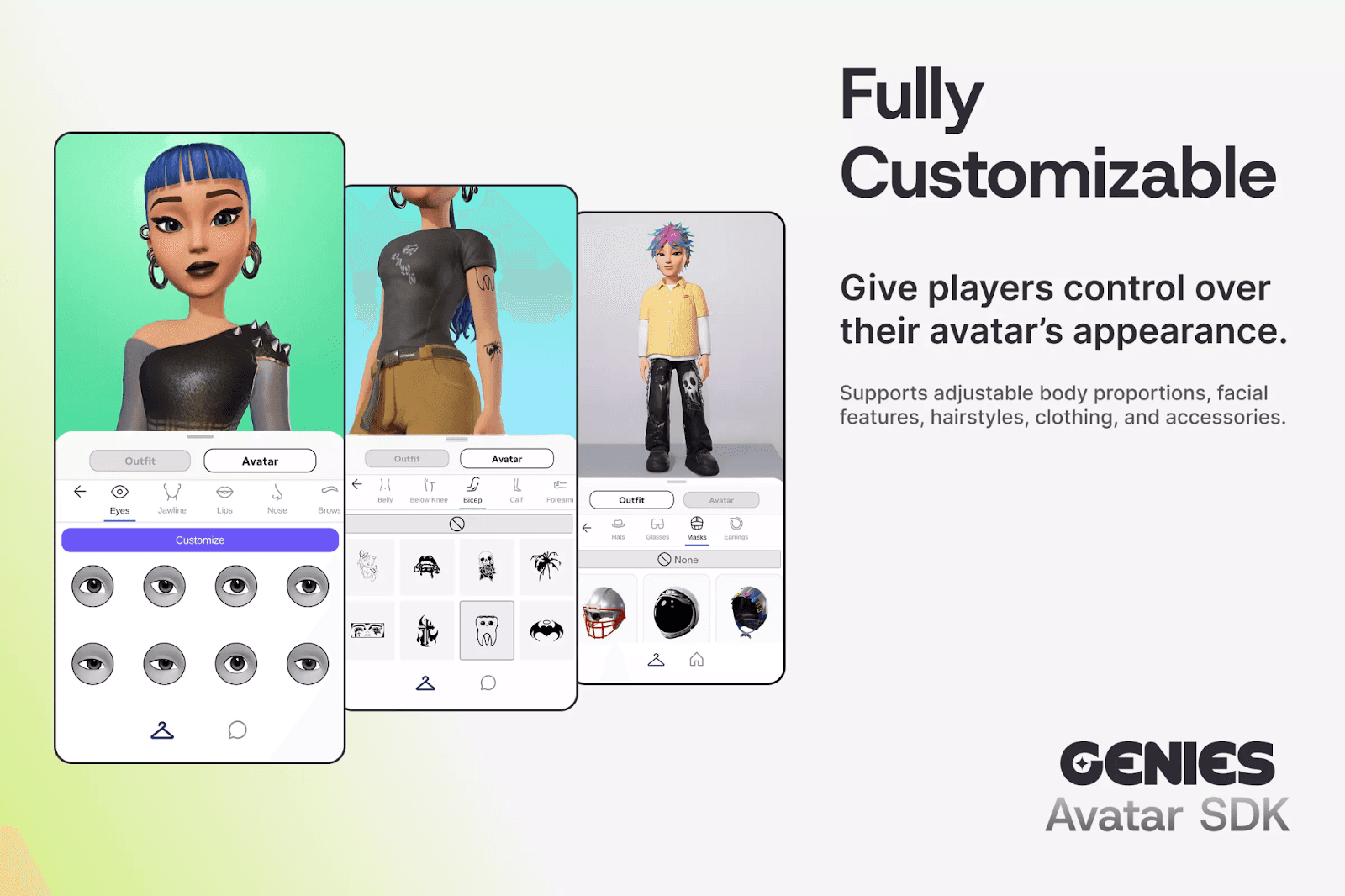
Preview of Genies avatar customization options for Unity SDK
Custom assets and 3D creation workflow
Genies provides a Developer Portal where you can manage avatar assets and upload custom outfits and accessories. We truly believe in the power of customization to improve the player experience, and by extension providing you the tools to monetize your own creations directly in-game.
We’ve put in a lot of effort to simplify the process of creating UGC content and are actively improving the tooling to make it even easier to use. With Genies, we provide a dedicated 3D creation section in our documentation, including guides for Blender, Adobe Substance 3D Painter, and Autodesk Maya, covering how to prepare, validate, and submit custom assets.
In addition, our team continuously releases new asset packs on the Unity Asset Store, and content is regularly added to the avatar creator so customization options keep expanding over time.
Addressing the big question: “How do we know Genies won’t shut down too?”
This is the most common and completely valid concern we have heard from developers.
Our partnership with Unity
One concrete signal of Genies’ long-term stability is our official partnership with Unity as an official Verified Solutions Partner. Through this partnership, we are working toward deeper Unity editor integration and tighter alignment with how Unity developers already build and ship games. We want to maintain a long-term commitment to the developer community at large to benefit from the tools we’ve been working on for so long and continue to use in our own products.
You can read more about this partnership in the official Unity blog.
We use our own product
Genies actively uses its own technology in a live consumer application Genies available on iOS. We rely on the same servers, services, and SDKs that we provide to developers.
Using our own product allows us to test and improve the platform in real production scenarios, just like your projects would. Identifying issues early and continuously improving the SDK is a top priority to make our tools better for you and for us.
Offline and self-hosted requirements
We have also heard from teams asking about local only avatar solutions, offline workflows, self-hosted infrastructure, and platform specific constraints, for example when building for platforms like Nintendo Switch.
These requirements vary significantly by project. If any of these apply to you, we want to hear from you directly. Please share your needs through our form so we can prioritize the most relevant solutions.
Roadmap: what we are building next at Genies
Genies is continuously improving the Avatar SDK. The current SDK already supports robust avatar creation and integration in Unity, and we are building on that foundation to make the experience even more flexible and powerful. This includes enhancements to avatar customization inside Unity, giving developers greater control over appearance, style, and integration with gameplay systems.
Beyond avatars, we are expanding the Genies ecosystem with additional SDKs focused on content creation and runtime systems, designed to unlock more possibilities for your projects.
Content Creation SDK
This SDK focuses on content creation, giving developers full creative control over avatars and worlds while ensuring everything looks visually and stylistically cohesive. It is designed to help studios:
Design custom, stylized avatars that are automatically rigged
Easily create clothing assets that match the look of characters and avatars
Build environments that complement the aesthetic style of the avatars
Unlock for developers: Quickly produce visually consistent avatars and worlds without spending weeks on manual setup.
Unlock for players: Experience unique, polished avatars and environments that feel integrated and immersive.
Animation Content and Systems
We are building highly flexible animation solutions for the Genies avatar rig in Unity, including body and facial animations powered by blend shapes. This provides:
A growing library of ready-to-use animations compatible with Genies avatars
Animation systems that reduce setup and retargeting work, so you can focus on gameplay and social interactions
Unlock for developers: Reduce engineering overhead and iterate faster on gameplay and social features.
Unlock for players: Enjoy more natural and engaging avatar movements that make interactions feel alive.
Smart Avatar Systems SDK
We are developing smart systems for both player characters and NPCs, enabling avatars to feel expressive and responsive in real time. These systems allow:
Avatars to respond intelligently to gameplay scenarios
Animations to be driven by character responses, reducing the need for custom behavior configuration
Unlock for developers: Create richer interactions without building every behavior from scratch.
Unlock for players: Interact with characters that feel alive, reactive, and more believable.
Our goal is to support not only avatar creation but also the cosmetics and worlds around those avatars, all within a consistent visual and technical framework.
Join the conversation
If you have a specific migration challenge, want deeper technical guidance, or need help evaluating whether Genies fits your project, join us on Discord or send us an email at devrelations@genies.com and talk directly with the team.
We are actively listening, iterating, and publishing more technical content based on what developers actually need.
By Allison Sturges - Director of Marketing