
Convert Image to AI Avatar Free: Best Free Tools Compared
A single smartphone photo can now build a complete digital model of your face. Dozens of web platforms let you test this process without paying a cent. Yet, many of these free options produce flat, static images that cannot move or interact.
A way to convert image to ai avatar free is to upload a headshot to an online tool that quickly extracts your main facial features and hair shapes. A study by the USC Institute for Creative Technologies shows that modern software can build a complete 3D model with face and hair meshes from a single photo. While most free online generators use these smart methods to make stylized cartoon pictures, they often limit you to low quality files and flat designs that cannot move. If you want a moving, game-ready 3D character that works across different virtual worlds, you must look past simple photo filters to find a better, embodied option.
Before you upload your photo to any site, you should understand how these tools process your likeness. We will explain how they build digital models and outline their real limits. To see how this tech works under the hood, let us start with What "Convert Image to AI Avatar Free" Tools Actually Do.
Ready to go beyond a flat picture? See the difference a high-fidelity, embodied character makes.
Start building your AI avatar with Genies Chat

What "Convert Image to AI Avatar Free" Tools Actually Do
Many online web apps let you convert image to ai avatar free with just a few clicks. You upload a single photo, wait a few seconds, and get a digital character. But the math behind this process is complex. These systems map the flat shapes of your face into a three-dimensional form.
Mesh reconstruction from a single photo
First, the software builds a digital skeleton of your head. You do not need special gear for this. An academic study on single image reconstruction shows that modern systems can build a complete avatar model from one photo. This process creates both face and hair meshes on its own. The software warps a base 3D shape until it matches your facial structure so the skeleton has realistic dimensions.
This mesh is like a plain gray clay mask. It has the right depth, but it lacks color and detail. To make the avatar look like you, the system needs to paint the surface.
This is where texture mapping comes in. It takes colors from your flat photo and wraps them around the new 3D shape. Without this step, your avatar would just be a blank shape with no eyes or hair.
Texture synthesis and neural inpainting
Getting the texture right is hard because a photo only shows the front of your face. The software cannot see the back of your ears or the sides of your neck. It also misses the back of your head. To fill in these blank spots, the tool must guess what those areas look like.
To solve this, the tool uses a mix of data-driven inpainting and neural synthesis to paint the hidden parts. The system scans other faces to learn common skin and hair patterns. This helps the AI fill in the missing colors so your avatar looks natural from any side. The software blends the new textures with your original photo to hide the seams.
Immediate use in games and apps
Once the mesh and textures are done, the avatar is ready for action. Smart systems can build a character in a few minutes. These fast tools let you create an avatar without coding any 3D models yourself.
This speed allows for instant use across different platforms. You do not need to wait hours for a designer to craft your digital double.
You can use these instant 3D characters in custom games, virtual social networks, and messaging apps. They let you express yourself online with a unique look. But while they are fast, they are often flat and do not move with real human emotion. To get a character that can talk and react, you need to go beyond basic free tools.
The Free AI Avatar Generators and How They Compare
Many web sites let you convert image to ai avatar free, but each tool works with different rules and limits. Some tools focus on video shows, while others apply graphic filters to your selfie. If you want to create an avatar without coding, you must first see how these free tools stack up.
A look at the top five tools
The free tools in this market cover different needs. Monica acts as a general helper that lets you quickly make a simple character. HeyGen focuses on business video. It has over 1,100 models and has made about 154 million videos.
Canva uses over 1 million design templates. This helps you place your static character in a flyer or slide. Fotor offers filters like watercolor art. It can also upscale your final file. Viggle is a video tool with over 40 million users and a 4.8 rating. But it limits what you can do without paying.
Most of these tools work by taking a single photo and building a digital model from it. According to a USC academic study, software can build a complete avatar model, including face and hair meshes, from a single input photo. While this process is fast, the free output is often a flat picture.
Some of these apps use smart data to build textured models. But most free web tools use simple paths. These paths only make a flat, static image. It is rarely a fully playable character.
Key limits on the free tier
While you do not have to pay to start, free tiers come with strict rules. When you convert an image, you must often deal with watermarks, low quality, or slow queues.
When you upload your face to online services, data storage and privacy rules vary. Your facial data is highly sensitive. A government policy report shows that systems handling these images need strict rules to protect your rights and privacy. Some tools delete your photos within two days, but others may keep them much longer.
Here are the common limits you will face on the free tiers of these popular tools:
Monica: This tool gives you a few daily credits, but it keeps your data safe. It removes your files after 48 hours.
HeyGen: You get a small trial credit to test their stock models. You cannot easily export high-quality files without a paid plan.
Canva: You can use their templates, but the best AI design features need a paid plan.
Fotor: The free tier adds a heavy watermark to your work. You must pay to use their upscaling tools.
Viggle: This tool only gives signed-in users about five free video renders per day, and the queues can be slow.
How the options stack up
To choose the right tool, you must compare how they handle your images. Some tools make a fast, flat avatar. But they lack the depth needed for virtual worlds or next-gen digital avatars.
The table below shows how these free tools compare. It helps you choose the best option for your goals.
Tool Name | Output Style | Free Daily Limit | Key Strength |
|---|---|---|---|
Monica | Static Image | Small credit limit | Deletes files in 48 hours |
HeyGen | Video Presenter | One free credit | Huge stock library |
Canva | Graphic Layout | Template use only | Great design tools |
Fotor | Artistic Filter | Watermarked files | Nice watercolor effects |
Viggle | Animated Video | Five renders per day | Realistic motion |
Choosing a tool depends on your final goal. If you want a quick graphic, Canva or Fotor will work fine. If you want to build a true virtual self, you may need to look past these simple filters to find more interactive options.
Where Free Photo-to-Avatar Tools Fall Short
Many web apps let you convert image to ai avatar free in just a few clicks. But most of these free tools have real limits. They often leave you with static images or low-quality results. If you want a character that can move, talk, and live across many virtual spaces, free tools often miss the mark.
Flat graphics and stiff motion
Most free tools do not build real 3D models. Instead, they warp your flat photo into a simple 2D sticker. They copy your face shapes but cannot make a deep, game-ready character. If you want your avatar to run, jump, or talk in a virtual world, these basic tools cannot help.
True character motion requires a complex bone skeleton called a rig. Researchers have built systems that map face and hair meshes from a single photo, but free apps skip this hard work. You can study these detailed mesh structures in research from the USC Institute for Creative Technologies. Without a 3D mesh, your avatar will stay stuck on your screen.
Watermarks, limits, and privacy risks
Free apps usually have a hidden cost. They offer a few quick renders to get you started, but they soon block you with a paywall. To keep using the tool, you must pay a monthly fee. These free tiers also add ugly watermarks to your finished designs, which ruins the look of your profile.
Even worse, free accounts often limit your output quality. Your avatars will look blurry or fuzzy because the high-resolution files are locked. If you plan to use your image for a game or a brand, you will need commercial rights. Free tools rarely give you these rights, so you cannot legally use your creation.
When you upload a real photo of your face, you also give away private personal data. Some free tools have weak privacy rules. They may store your image or use your likeness to train their models without your clear consent. Checking a tool's policy is crucial before you upload any photo.
A few tools state that they encrypt and delete photos within 48 hours, but rules vary. Government reports show that commercial facial services often raise big civil liberty concerns. You can read about these issues in the Government Accountability Office report on facial technology. If you do not want your personal data stored forever, you should avoid shady free apps.
What to do instead
If you want to build a real digital presence, skip the flat generators. You can create an avatar without coding by using tools that focus on high fidelity and character movement. This approach gives you a full 3D model that you can use across many games and platforms.
A proper 3D character is rigged and ready for action. It is not just a flat image file that sits on your hard drive. Instead, it is a lively character that can talk, emote, and react to your commands. This lets you truly express yourself in the digital world.
What to Look For in an AI Avatar Tool
When you want to convert image to ai avatar free, you need to look beyond the quick thrill of the first render. Many free web tools generate basic, flat images that you cannot use in virtual worlds. To find a tool that truly serves your digital presence, you must assess several key rules and limits. A checklist can help you check what each platform offers.
Upload a clear, well-lit photo of your face or upper body.
Pick a rendering style, such as realistic, cartoon, anime, or 3D.
Let the tool map your features and generate the first draft avatar.
Review the output for resolution, watermarks, and animation support before you download it.
Mesh Quality and Animation Rigging
Most free tools only output a flat 2D graphic. While a static image is fine for a profile picture, it lacks the depth needed for virtual spaces. You want to look for tools that can build a true 3D mesh of your face and hair. If you want to create an avatar without coding, choose a system that can build a dynamic shape from a single selfie.
A good avatar needs to move. Without a bone rig, your character is just a flat statue. Make sure the tool you choose supports standard skeletal rigging and facial movement. This ensures your avatar can talk, walk, and react across different virtual worlds. Look for tools that export your rigged character as a standard format so you can use it in games.
Privacy and Data Policies
When you upload your photo to a web app, you are sharing your own data. Many free sites keep your images on their servers to train their own neural networks. This practice can put your online likeness at risk if the database is not secure or if the site shares your data with third parties.
You should review each platform's data policy before you upload your face. Facial recognition reports from the Government Accountability Office highlight the critical need for strict data controls to protect civil liberties. Look for tools that encrypt your uploads and promise to auto-delete your raw files within forty-eight hours.
Commercial Rights and Platform Limits
Free tiers always come with catches that limit how you can use your work. You need to watch out for strict rules on commercial use, low image resolution, and unwanted watermarks. Here is a checklist of key limits to scan for before you commit to a platform:
Watermarks: Free sites often stamp their brand logo right over your avatar's chest or face.
Resolution limits: Free files are often too small or blurry for high-res screens.
Commercial rights: Some tools block you from using your avatar on your own store or channel.
Daily quotas: Many free tools restrict you to just three or four renders per day.
If you plan to use your character for a brand or business, search for a tool that grants you full ownership. A good avatar should also work across different devices and apps. Avoid locked-in file types that prevent you from taking your avatar to other virtual worlds.
Why Fidelity Matters: From a Filter to a Character
Many free tools online let you turn a photo into a flat picture. But there is a massive gap between a flat profile sticker and an active, living character. When you want to express yourself online, a static filter is not enough. High fidelity means your digital self can move, react, and exist as a real character in virtual spaces.
Flat Filters Versus Game Ready Models
Most basic web tools only edit the top layer of a photo. They apply a style or blend lines to make a cartoon. This kind of output is just a flat image that stays in one place. It cannot walk, run, or change its expression. It remains stuck in two dimensions with no way to turn or bend. To go beyond a simple filter, you need a model built for active use.
A basic flat filter typically only looks good from the front view. If you turn the view, the illusion falls apart. 3D models build a mesh that has a back, sides, and a top. This extra depth lets digital lights and shadows fall on the character in a natural way. It behaves much like a real physical object sitting in a virtual room.
True 3D models use complex math to map the unique shapes of your face. You can read about these systems in academic research on 3D avatars, which shows how a single photograph can form face and hair meshes. This means your face shape is recreated in three dimensions. You get a digital object that can turn its head and show real depth.
How Rigging and Animation Bring Characters to Life
Creating a 3D model from a photo is only the first step in this process. To make it behave like you, the model needs a skeleton. In the digital world, this skeleton is called a rig. Rigging adds interactive joints and bones directly to the digital 3D mesh. Without a proper skeletal rig, a digital model is just a stiff statue that cannot move at all. With a rig, it can perform active movements in games and virtual worlds.
If you try to convert image to ai avatar free, you often end up with a static file. Many free tools do not offer rigs or skeletal frameworks. You cannot use them to walk through a virtual space. High-fidelity avatars must be ready for full body movement. They need to respond to your inputs and interact with their world.
The Value of High Fidelity and Embodiment
Embodiment means your avatar acts as an extension of yourself. When you use tools to build next-gen digital avatars, you want them to feel alive. They should not just look like you from one angle. They must show your style, hold your posture, and move across different digital platforms.
Genies focuses on this high-fidelity embodied framework. It moves away from flat output and brings your character into 3D life. Users can create a 3D avatar without coding and use it across many spaces. This approach ensures your digital self is ready to play, chat, and express your real mood.
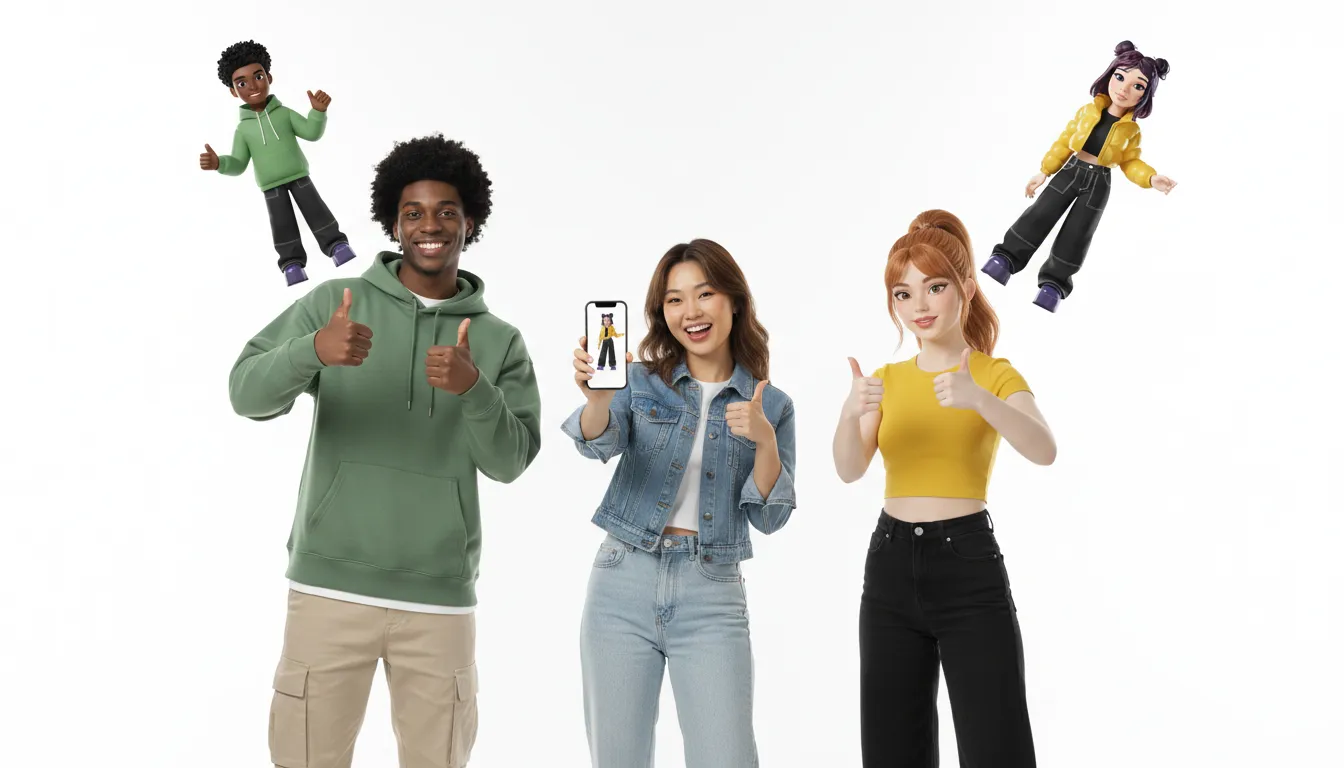
Standard static photos cannot cross from one app to another on their own. They remain locked within the specific tool or website that first created them. A true digital character must be interoperable across different platforms. It should walk with you from a chat app into a 3D game. Having a stable 3D shape makes your online self feel whole and real.
How a Free Avatar Generator Compares to an Embodied Genies Avatar
Many people want to convert image to ai avatar free to see how they look in a virtual world. Most free web tools let you upload a selfie and quickly get a static image back. But these simple profile files are not the same as a live digital character. If you want to use your character across other virtual spaces, you need an embodied avatar.
The limits of free image generators
Standard online tools use simple filters to change your photo. These systems do not build a real three-dimensional form. Instead, they just adjust the pixels of your photo to look like a cartoon or a sketch.
The result is a flat graphic that stays stuck on your screen. You cannot move its arms, change its pose, or use it in a game. You also cannot view the image from other angles because it has no depth.
Some advanced tools can build a simple mesh from a single photo. Researchers at USC ICT show that new systems can automate avatar model reconstruction for face and hair shapes.
But free web generators rarely use these advanced models. They often put watermarks on your work or lock the best files behind a paywall. You also do not get business rights to use your new character. This means you do not own the rights if you want to sell your content later.
The features of embodied characters
An embodied character from Genies is built for motion from the start. It is a full 3D model that is ready for games and social worlds. These characters have skeletal rigs so they can run, jump, and dance.
You can easily create an avatar without coding and use it across many platforms. This gives your digital self a true presence online. It acts as an active character rather than just a basic sticker.
These next-gen digital avatars also have behavior. They do not just sit there like a flat image file. They can react to prompts and show their feelings in apps.
For example, Genies Chat lets you talk with characters that move and act in real time. They have their own style and can travel with you to other digital spaces. This lets your character grow with you as you explore new worlds.
A direct comparison
Look at how a basic free generator compares to a full 3D character. A flat tool works well for a quick social media profile picture. But if you want a character that can move, talk, and play in games, a 3D avatar is the clear choice. Free generators output a static 2D portrait with style filters and no animation. Genies builds a high-fidelity 3D model with full skeletal rigging, so it can move and express. Free output stays stuck on one site as a static file, while a Genies avatar is built to work across different digital platforms.
This breakdown shows the clear gap in quality and use. Free tools are fine if you just want a quick profile update. But they cannot match the depth of a true 3D character. When you want to step into the digital world with your own style, an embodied character is the best way to do it.
Want a moving, game-ready character instead of a sticker? Bring your digital self to life across communities and worlds.
Get your high-fidelity avatar with Genies Chat
Frequently Asked Questions
How can I convert an image to an AI avatar for free?
Yes, to convert image to ai avatar free, you can upload a clear selfie to web-based platforms like Viggle AI or Monica. These tools process your photo using simple mapping models to create stylized graphics or quick clips in seconds. However, if you want a high-fidelity, game-ready character instead of a flat graphic, check out Genies Chat.
Is it really free to convert an image to an AI avatar?
Most web tools offer a basic free tier with daily limits. They still restrict the best features. You must pay to remove watermarks, get high-res files, or use the images for business. While you can get simple clips at no cost, true ownership and full features usually sit behind a paid wall.
How do free avatar generators build 3D models from a single image?
Basic web tools use simple face-mapping lines. However, top research shows that smart systems can build a full avatar from just one photo. This breakthrough was published by the team at USC ICT. These systems use neural networks to paint textures and turn flat pictures into 3D characters.
Are AI avatars created from photos secure?
Security varies by service. Many tools claim to delete uploaded photos in 48 hours, but others may store your face details. In fact, risks around face data led the GAO to highlight the need for clear civil liberties policies. Always check a tool's privacy policy first.
Are You Ready to Create Your High-Fidelity 3D Avatar Today?
If you stay stuck with simple, flat photo filters, your online presence remains limited to quiet, static images that cannot move, talk, or play. Starting to build your 3D character today allows you to claim your own space in the virtual world without any delay or long wait times. To see how these assets work across many platforms, you can read our clear guide on next-gen digital avatars.
Ready to contact us? Our friendly team is happy to help you build, style, and use your custom virtual character across many platforms right now.